Unlocking Creativity and Professionalism with the Numelo Google Slide Template
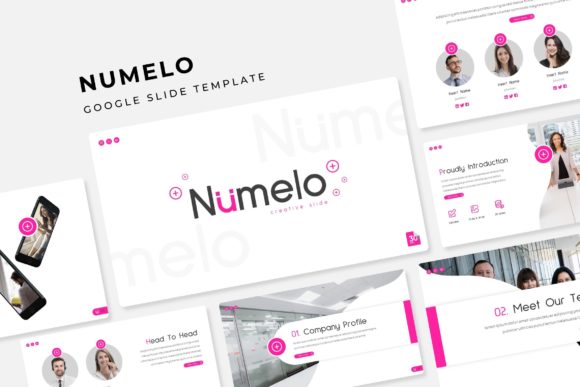
The Numelo Google Slide Template is a versatile and comprehensive tool designed to elevate your presentations, whether you are a professional, educator, or business owner. This template offers a robust set of features that cater to various needs, from creating engaging infographics to showcasing portfolios in a visually appealing manner.
Key Features of the Numelo Google Slide Template
- 150 Total Slides: The template includes 150 slides, providing ample space for all your content and ideas.
- 5 Premade Colors: Choose from five professionally designed color schemes, each with 30 slides, allowing you to customize the look and feel of your presentation.
- Handcrafted Infographics: Utilize beautifully crafted infographics to present data and information in an engaging and easy-to-understand format.
- Section Break Slides: Clearly demarcate different sections of your presentation with specially designed section break slides.
- Gallery and Portfolio Slides: Showcase your work or products effectively with dedicated gallery and portfolio slides.
- Resizable and Editable Graphics: All graphic elements are fully editable and resizable, ensuring flexibility and customization.
- Picture Placeholder: Drag-and-drop images into pre-designed placeholders, making it easy to add visuals without compromising on design.
- Based on Master Slides: The template is built using master slides, which ensures consistency across all slides and simplifies the editing process.
- Pixel-Perfect Illustrations: Enjoy high-quality, pixel-perfect illustrations that enhance the visual appeal of your presentation.
Included Files and Resources
The Numelo Google Slide Template comes with everything you need to start creating stunning presentations:
- 5 PPTX Files: Five PowerPoint files, each with a different color scheme, providing options to match your brand or personal preference.
- 5 PPTX Widescreen Files: Additionally, five widescreen PowerPoint files are included, offering a modern and expansive layout.
- Readme First Document: A detailed guide to help you get started, including instructions and tips for using the template.
- Free Font Download Link: Access to the free fonts used in the template, ensuring that your presentation maintains its intended aesthetic.
Practical Applications and Use Cases
The Numelo Google Slide Template is incredibly versatile and can be used in a wide range of scenarios:
- Business Presentations: Create professional and polished presentations for client meetings, pitches, and internal briefings.
- Educational Lectures: Enhance your teaching materials with visually engaging slides that help students better understand complex concepts.
- Creative Projects: Showcase your creative work, such as photography, design, or art, in a well-structured and visually appealing manner.
- Research Presentations: Present your research findings with clear and concise infographics and well-organized sections.
- Marketing Campaigns: Develop compelling marketing presentations that highlight your brand's unique selling points and value propositions.
Advantages of Using the Numelo Google Slide Template
By choosing the Numelo Google Slide Template, you gain several key advantages:
- Time-Saving: The pre-designed slides and elements save you time, allowing you to focus on your content rather than the design.
- Consistency: The use of master slides ensures that your presentation maintains a consistent and professional look throughout.
- Customizability: With fully editable and resizable graphics, you can tailor the template to meet your specific needs and preferences.
- Professional Design: The high-quality, pixel-perfect illustrations and handcrafted infographics give your presentation a polished and professional appearance.
- Versatility: The template's versatility makes it suitable for a wide range of applications, from business to education and beyond.
Considerations and Tips for Effective Use
To make the most of the Numelo Google Slide Template, consider the following tips:
- Choose the Right Color Scheme: Select a color scheme that aligns with your brand or personal style to create a cohesive and professional look.
- Use High-Quality Images: Ensure that the images you use are of high quality to maintain the visual integrity of your presentation.
- Leverage Infographics: Utilize the handcrafted infographics to present data and information in a visually engaging and easy-to-understand way.
- Keep It Simple: Avoid overloading your slides with too much information. Keep your content clear and concise for maximum impact.
- Practice Your Presentation: Familiarize yourself with the flow of your presentation to deliver it smoothly and confidently.
By following these tips and leveraging the full range of features offered by the Numelo Google Slide Template, you can create presentations that not only impress but also effectively communicate your message.